

Roles and Permissions Feature Overview
The Roles and permissions page gives you control over what each member of your project team can see and do across Newforma Konekt’s activity centers. The Default Project Roles tab shows the exact permissions each role carries per activity center. If those don’t fit your team’s needs, the Custom Project Roles tab lets you tailor permissions to create roles that go beyond the defaults.
The Roles and permissions page is only accessible to hub admins.
Default Project Roles
The Default Project Roles tab is a reference view showing what each of Newforma Konekt’s four built-in roles—Reviewer, Reader, Editor, and Admin— can do across all activity centers.
Use the left panel to browse by activity center and see the permissions associated with each role. These roles cannot be modified.
Custom Project Roles
The Custom Project Roles tab lists the custom roles you’ve created, showing how many users and projects each role is assigned to. The list will be empty until you create your first role using the Create Role button.
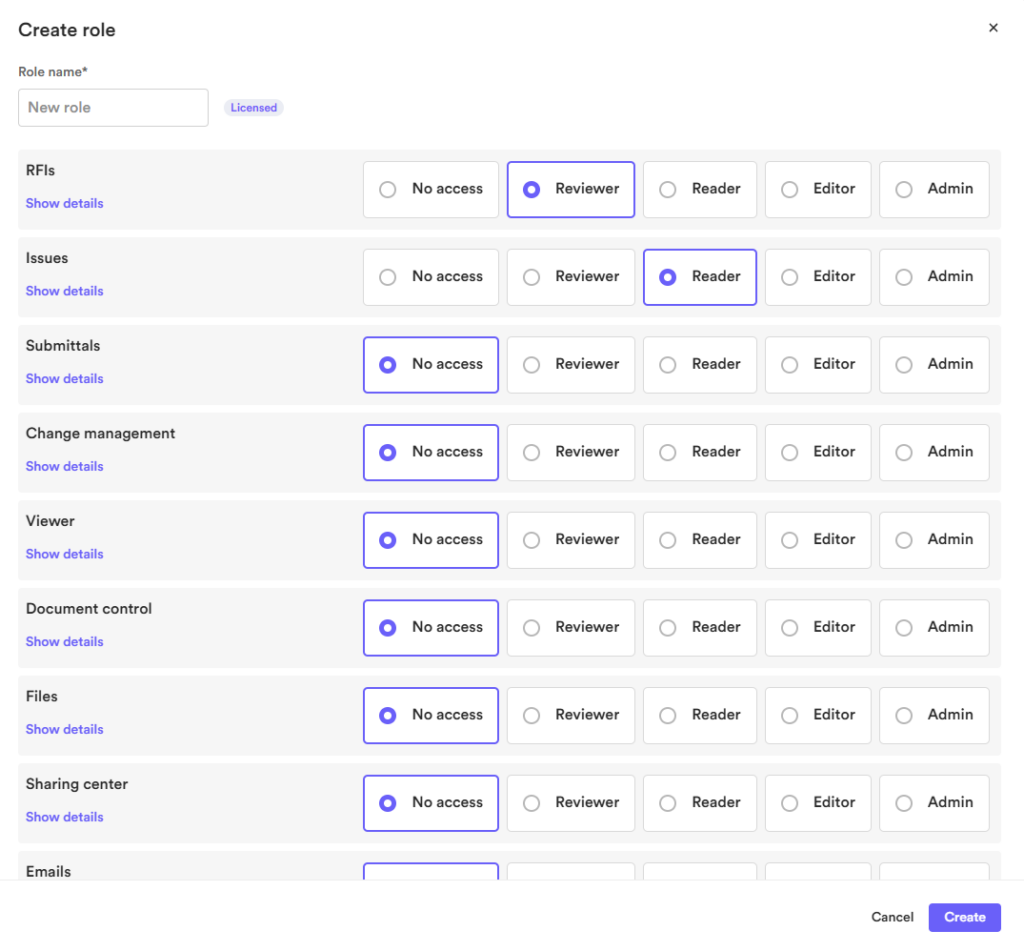
When creating a custom role, you define the level of access it has for each activity center individually. Rather than applying a single access tier across the board, you can, for example, create a role with Admin access to Files while limiting it to Reader for Change management.
Projects, Seats and Licenses
The Custom Project Roles tab lists every custom role you’ve created, along with three counts for each one:
- Projects: The number of projects in which this role is used in.
- Seats used: The number of seats associated with this role.
- License: Whether users assigned to this role require a license.
FAQ
Can I assign roles to users from the Roles and permissions page? No. Role assignment is done from the User management page. The Roles and permissions page is for reviewing default roles and managing custom ones.
Are roles defined at the project or hub level? At the project level. This means the same user can be assigned different roles depending on the project.
Can I edit an existing custom role? Yes. When a custom role is edited, permission changes apply immediately to all users assigned that role.
Can I delete an existing custom role? Yes. If you attempt to delete a custom role that still has users assigned to it, you’ll be prompted to reassign those users to another role first. You can also manually unassign or reassign users before deleting the role. A custom role cannot be removed while it still has assigned users.