

Entra ID Integration: Technical Overview
The Entra ID integration provisions users from your Microsoft tenant to Newforma Konekt, so you do not need to add each user manually. The integration also deprovisions users when they are removed from Entra ID.
The sections below cover how the integration works, how to set it up, and its limitations.
Requirements
These are the requirements for the Entra ID integration:
- A Microsoft tenant
- An Enterprise subscription for Newforma Konekt
Your Microsoft tenant does not require any configuration before you integrate it with Newforma Konekt. A hub owner or hub admin can set up the integration.
Architecture
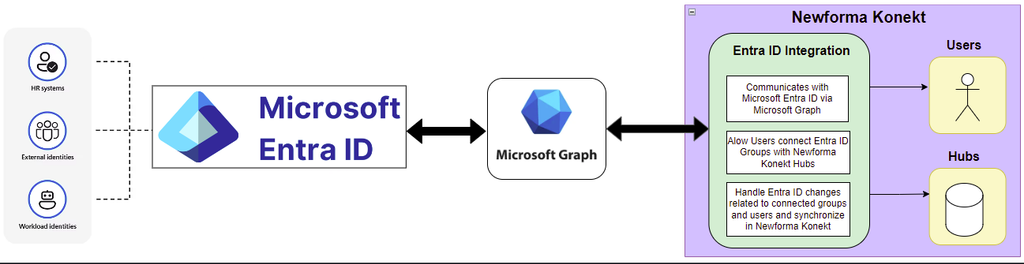
The Entra ID integration uses Microsoft Graph to detect changes to users and groups in your Microsoft tenant. When a change occurs, Newforma Konekt synchronizes it to keep your member groups up to date. For example, if you add new members to an Entra group that is connected to Newforma Konekt, those members are added to the corresponding member group in Newforma Konekt.
The Entra ID integration is a custom integration and does not use SCIM. Because it does not rely on SCIM, the integration supports nested groups and does not require you to configure your Microsoft tenant to provision user information to Newforma Konekt.
Information and Permissions Imported
The Entra ID integration imports only the user information required to provision users from Entra ID. Combined, this information includes personally identifiable information (PII). For details on how Newforma Konekt handles personal information, see the privacy policy.
The Entra ID integration imports the following user information:
- Unique Microsoft ID
- User Principal Name (UPN)
- First name
- Last name
- Company
- Country
- State
- Job title
- My Site
- Account status (enabled or disabled in Entra ID)
Newforma Konekt uses this information as follows:
- UPN: Used for single sign-on (SSO) and to match Entra ID users with existing Newforma Konekt users, which prevents duplicate accounts. SSO is optional for the Entra ID integration.
- Unique Microsoft ID: Used to maintain a one-to-one link between a Newforma Konekt user and their Entra ID user, so the link is preserved if the user’s email address changes.
- Email address: Used to log in to the Newforma Konekt Outlook add-in.
When a user’s UPN changes in Entra ID, Newforma Konekt updates the UPN automatically (changes will need to be confirmed with Newforma Customer Support). All other user information imported by the Entra ID integration is synchronized only once, when the user is first added to Newforma Konekt from an Entra group. This happens either when you set up the integration or when the user is later added to an Entra group connected to Newforma Konekt.
The Entra ID integration is registered in your tenant as an enterprise application. It requires the following delegated permissions in Microsoft Graph:
User.Read.AllDomain.Read.AllGroup.Read.AllGroupMember.Read.All
These permissions give Newforma Konekt read-only access to your Microsoft tenant. Newforma Konekt cannot add or update information in Entra ID user profiles. Synchronization is one-way, from Entra ID to Newforma Konekt. For example, if you change a user’s job title in Newforma Konekt, the job title in Entra ID does not change.
Activity Logging
Newforma Konekt records activity logs for changes made to connected groups and users by the Entra ID integration.
To keep an audit trail on the Entra ID side, you can enable Microsoft Graph activity logs in your tenant. Microsoft Graph activity logs record every HTTP request that the Microsoft Graph service receives and processes, including requests made by Newforma Konekt. For details, including pricing, see Microsoft Graph activity logs overview.
A One-Time Setup
The Entra ID integration is configured at the hub level by a hub owner or a hub admin. It is designed to incur minimum upfront effort and ongoing maintenance.
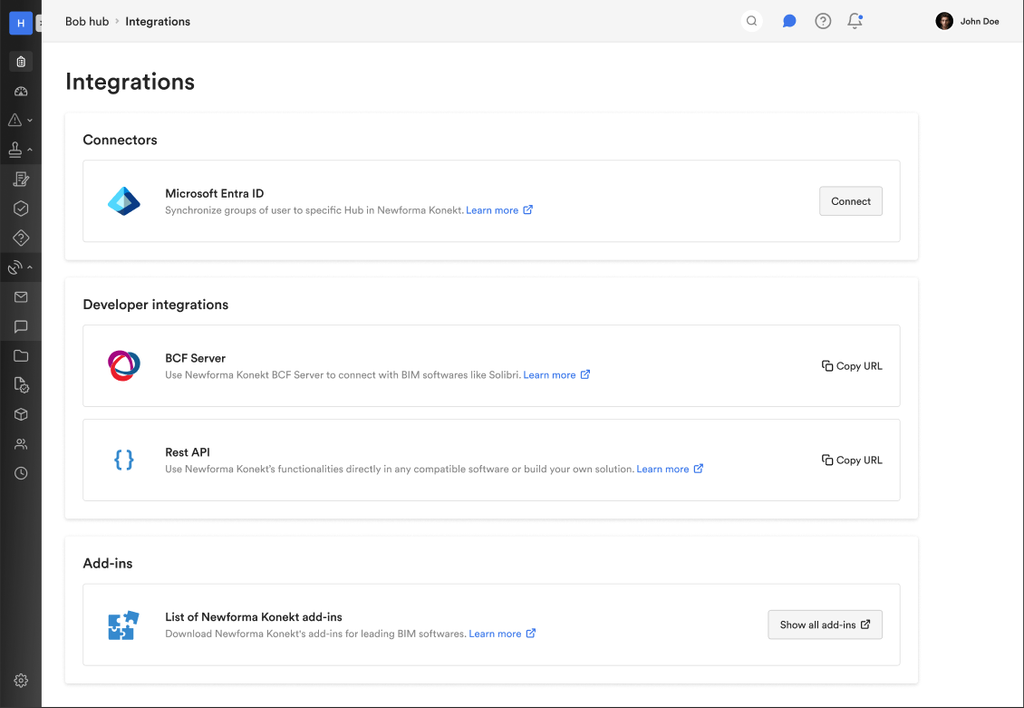
Before a hub owner or hub admin can import groups from Entra ID, they must connect Newforma Konekt to your Microsoft tenant. Connecting the Entra ID integration involves two steps:
- The hub owner or hub admin signs in with their Microsoft account and requests read-only access for the integration.
- An Entra ID administrator in your organization approves the request.
The connection is complete once the request is approved. Approval is required only once.
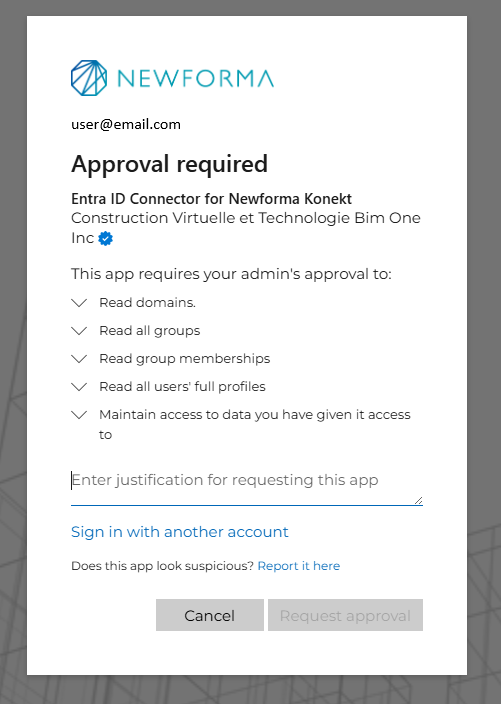
The Entra ID integration needs read-only access to read user information and provision users to Newforma Konekt. When an Entra ID administrator reviews the access request, Microsoft lists the following permissions:
- Read domains
- Read all groups
- Read all group memberships
- Read all users’ full profiles
- Access to data you have given it access to
After the connection to your Microsoft tenant is approved, Newforma Konekt stores an encrypted access token. Newforma Konekt reuses this token each time the Entra ID integration runs, so the hub owner or hub admin does not need to sign in again.
Once the connection is approved, a hub owner or hub admin can import Entra groups to Newforma Konekt. You can import multiple Entra groups at the same time. Users in imported groups are provisioned to Newforma Konekt.
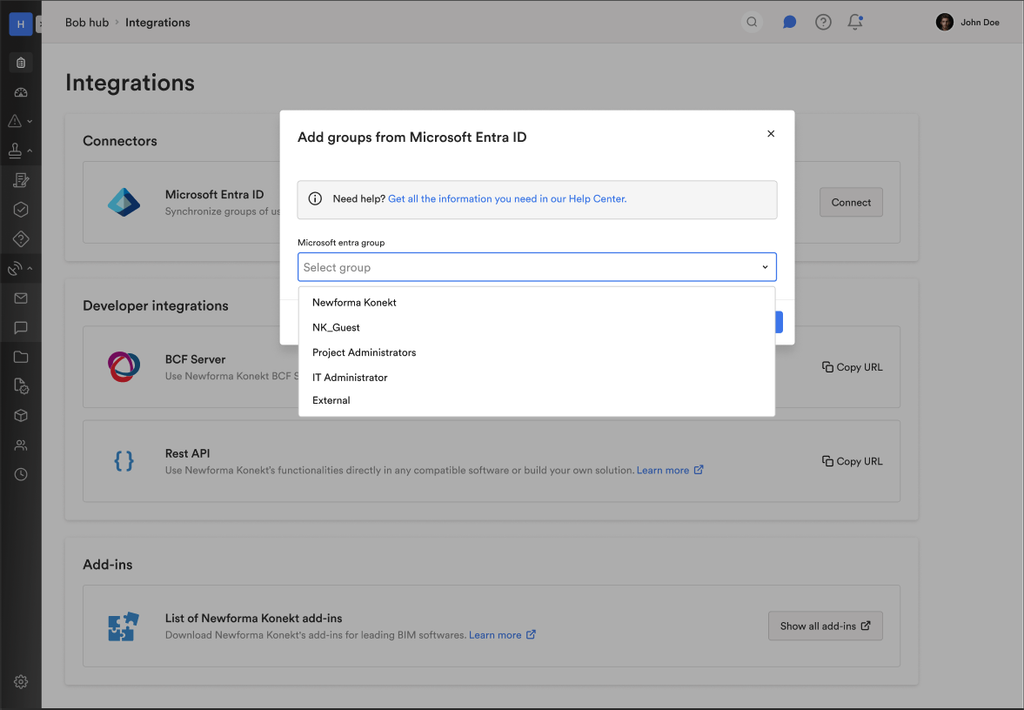
After you import an Entra group, you manage its membership in Entra ID, not in Newforma Konekt. When a user is added to a connected Entra group, Newforma Konekt provisions that user automatically. Group membership changes appear in Newforma Konekt within about one minute.
When Newforma Konekt provisions a new user from a connected Entra group, the user receives an email inviting them to join Newforma Konekt. Users who already had a Newforma Konekt account before being added through the Entra ID integration do not receive an invitation email.
Limitations
The Entra ID integration does not import the following users from Entra ID:
- Users missing a first name, last name, or email address.
- Users who are disabled in Entra ID.
- External users (guest users from another Microsoft tenant)
When a user in a connected Entra group already has a Newforma Konekt account, the integration links the existing account to the user’s Entra ID account instead of creating a new one. This prevents duplicate accounts.
The Entra ID integration does not manage user licenses, hub roles, or project assignments. Manage these from the User Management page in Newforma Konekt.
For users provisioned from Entra ID, the email address cannot be changed in Newforma Konekt. All other user information can be updated in Newforma Konekt. Changes made in Newforma Konekt do not update Entra ID.