

NextGen Viewer Overview
2 minutes
3 years ago
Newforma Konekt NextGen Viewer allows you to display and navigate IFC models and PDF sheets, as well as create and manage issues in Newforma Konekt. You can also overlay sheets on models for maximum issue context.
This article provides an overview of the interface and features of Newforma Konekt NextGen Viewer.
Interface Overview
You can access the Newforma Konekt NextGen Viewer from the Project menu by clicking Viewer.
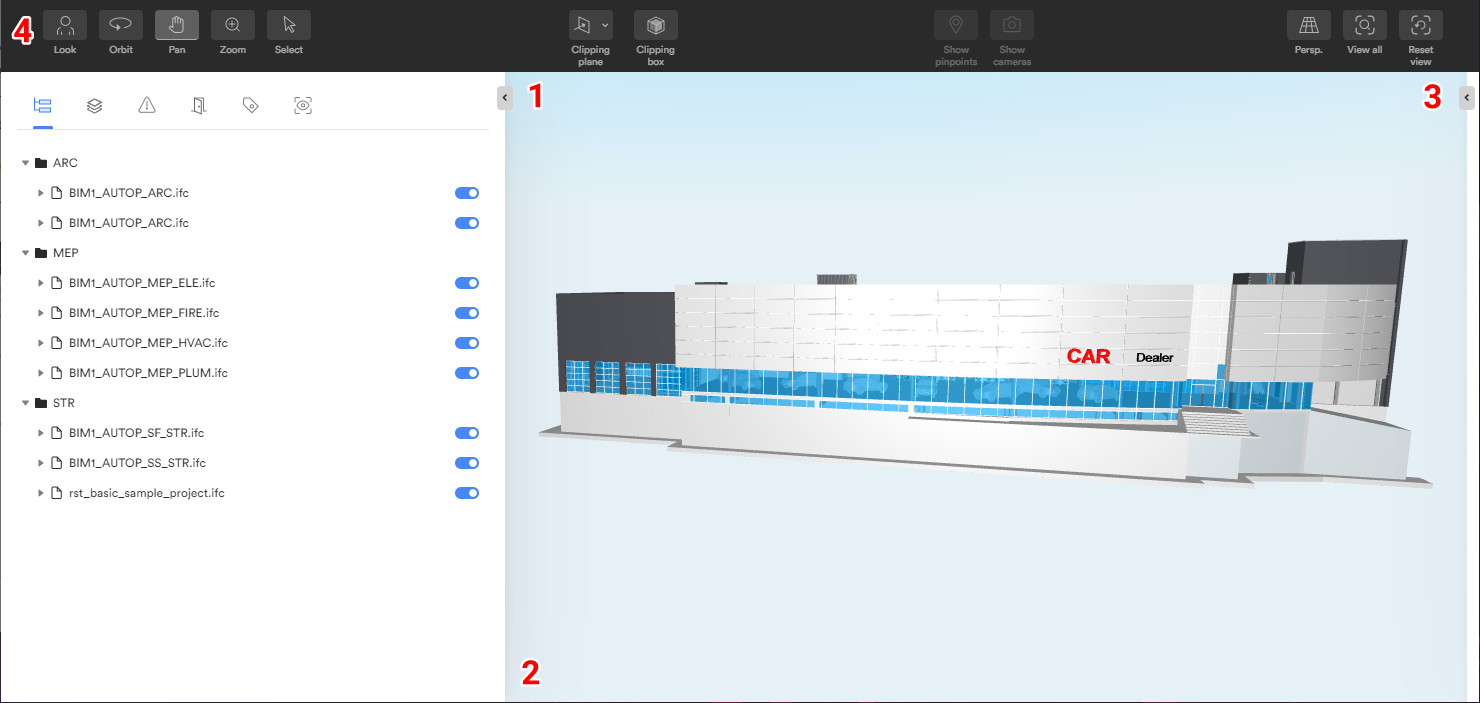
The interface is divided into four parts:
- Main panel – A panel on the left side of the interface, with tabs that allow you to perform a wide range of actions on models, sheets and issues.
- Viewing area – The largest part of the interface, which displays all selected files.
- Right-side panel – A panel on the right side of the interface, which allows you to view element properties and view/edit issue details.
- Toolbar – A dynamic toolbar at the top of the interface, where you can find navigation and sectioning tools. The tools available in the toolbar vary depending on whether you are viewing 3D or 2D files.s and many improvements in terms of speed and performance.
Technical Support
If you encounter any technical problems while using Newforma Konekt NextGen Viewer, please feel free to contact our support team.